Why It Works

Make your tasks as easy as playing a video game.

by Laurie Hérault, creator of Colonnes

Behind this promise is a simple question: why can we stay focused for hours on a video game, but struggle to focus or end up procrastinating on everyday tasks?

Part of the answer is that games are designed to capture and keep our attention. Most day-to-day work is not.

The goal of the first part of this article is not to make our tasks “fun,” but to show how to structure work so execution becomes easier and procrastination decreases, especially when the tasks are boring.

The second part of the article will show how the Colonnes app can help with this process. Colonnes does not replace your reminder app or your calendar. It complements them by helping you organize tasks more effectively and making execution easier.

Why games keep you moving

Have you ever caught yourself thinking, "I'll just finish this quick little task in a video game and then stop," only to realize that three hours later you're still playing?

Think about the different goals in games like Far Cry, Assassin's Creed, or similar games: main missions, side missions, collecting resources, crafting items, freeing an outpost, climbing a tower to reveal part of the map. It's basically a giant to-do list.

But these tasks are structured in a way that makes them enjoyable:

  • The task is clear and well-defined
  • It is quick to do, often just a few minutes
  • It feels easy to start and not overwhelming

Cutting down a tree in Minecraft is simpler, faster, and less intimidating than cutting down a tree in real life.

Every task in a video game brings you closer to your current goal. Because there are many quick tasks, the feeling of progress is constant. In a video game, progress is shown visually in many ways, such as a progress bar, a quest log, achievements, completed challenges, or visible changes on the map.

At the heart of every video game is immediate feedback after an action. When you do something, you instantly get a response. This feedback can be visual, audio, or even physical for console players.

In a shooting game, when you aim, shoot, and hit your target, you receive instant positive feedback. It usually combines multiple signals at once, often across multiple senses: a visual effect on the target, a satisfying sound that confirms the hit, a change in the reticle, and more.

Another key idea is that the challenge must match the player's level. If it is too easy or too difficult, the player gets bored or gives up.

Novelty and randomness also play an important role. When you finish a game and there is nothing new left, you probably do not want to play it again. But if you give yourself an extra challenge, such as finishing it within a certain time, you may want to replay it. This is the idea behind speedrunners who try to beat a world record.

The last point may seem superficial, but it can truly ruin the gaming experience.

If you need to complete a specific action, for example a quest in a role-playing game, and you have to open three different menus just to remember what to do, the frustration can be huge. On the other hand, if the task stays constantly visible in your field of view, it increases engagement in the game.

How to apply these principles

An atomic task is the most important concept. Inspired by video games, we already defined several criteria: clear, well-defined, quick, easy to start, and not overwhelming.

Take the task "Pay the bills," which often feels overwhelming. We can break it down into atomic tasks like this:

  • Find the internet bill for this month
  • Find the phone bill for this month
  • Find the rent bill for this month
  • Log in to your online bank
  • Pay the internet bill
  • Pay the phone bill
  • Pay the rent
  • File the bills in your folder

Of course, this does not increase the total amount of work or the total time. You are not doing more. You are doing the same work. It is just structured differently.

You also need to stay flexible about how long an atomic task should be. There is one rule: the more you procrastinate, the smaller the steps should be. "Quick" depends on context: for a very boring task, an atomic task might be just a few minutes; for a task you enjoy, an atomic task can be 10-30 minutes.

This is a simple example where everything is on one level. But in a long and complex project, your tasks will be organized as a multi-level tree. Each level breaks the parent task down into smaller tasks.

1. Clean the house
1.1 Kitchen
Check box1.1.1 Wash plates
Check box1.1.2 Wash pans and pots
Check box1.1.3 Vacuum the floor
Check box1.1.4 Scrub the floor
Check box1.1.5 Take out the trash
1.2 Office
Check box1.2.1 Wipe the desk
Check box1.2.2 Dust the furniture
Check box1.2.3 Vacuum the floor
Check box1.2.4 Scrub the floor
1.3 Bedroom
Check box1.3.1 Air out the bed
Check box1.3.2 Make the bed
Check box1.3.3 Vacuum the floor
Check box1.3.4 Scrub the floor

Here are the benefits of breaking your work down in this way:

  • The first atomic task is much easier to start than a big, overwhelming task, which reduces procrastination.
  • Because the next tasks are also atomic, it becomes easier to keep going, execute consistently, and build momentum.
  • No matter what tool you use to manage your tasks, software or paper, you will get more feedback and a stronger sense of progression because you complete several small tasks instead of one large one.

Do not underestimate the effect momentum can have on you.

If your task list is especially boring, you can add time pressure by setting a time goal or using a method like Pomodoro. Of course, if this creates too much anxiety, do not use it. And avoid using time pressure in any environment that could be dangerous for you or for others.

You can add even more feedback by writing each task on a small piece of paper or a sticky note. Because you can crumple the paper into a ball when you finish a task. You feel it in your hands and you hear it. That haptic and auditory feedback is stronger than simply checking a box in task management software. The second advantage is that the task stays always visible in your field of view, helping you avoid distractions.

Why most task tools fail when you procrastinate

Procrastination is less about capture and planning, and more about task structure and execution. When you try to apply atomic tasks, visible progression, immediate feedback, time pressure, and an always-visible next action in most tools, you often hit the same friction points:

  • Overwhelming lists
    Big lists, deep trees, and long backlogs make work feel larger than it is. The next action gets buried, and you waste attention navigating and scrolling instead of starting.
  • Busywork instead of progress
    Dates, tags, priorities, and reminders can be useful, but when you're procrastinating, filling them in becomes an easy way to avoid the work.
  • Calendar-first, guilt-second
    Scheduling everything assumes your day is stable. In real life, priorities shift, interruptions happen, and the plan collapses, leaving you with frustration and guilt.
  • They do not create momentum
    Planning is easy in most tools, but without an execution flow and feedback reinforcement, momentum dies quickly.

To be clear, the point is not that these tools are useless or that they do not work. They are the best solution for many use cases and many jobs. For example, a salesperson who goes from meeting to meeting often needs a calendar-style task system.

The point is that deep work and boring tasks often require a different solution, and a different paradigm.

How Colonnes solves it

A view that prevents overwhelm

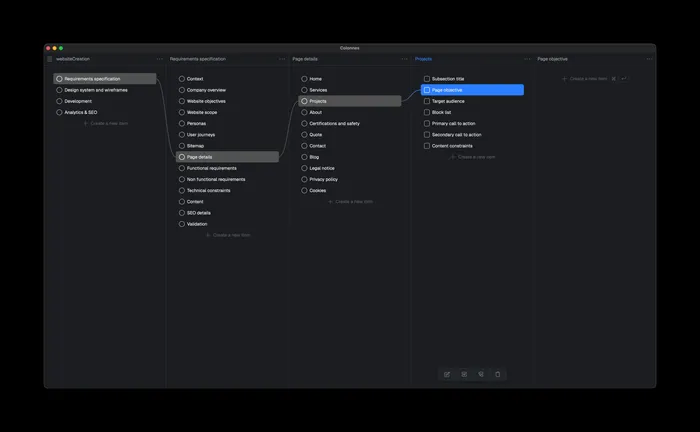
Instead of a long, intimidating tree, Colonnes uses a column view inspired by macOS Finder. You only see what matches your current context, so even a project with 1,000 tasks stays navigable and not overwhelming.

Here is a small demo of the column concept with three levels:

Less metadata, more action

To keep this view clean and usable at any scale, Colonnes is built around just two types of items.

An atomic task is the simplest possible unit of work. It has only two things: a status (done or not done) and a text description.

If an item contains child tasks, it becomes a task group. Instead of a checkbox, it shows progression based on the completion of its child tasks.

This simplicity is intentional. Colonnes follows one principle: less metadata, more action. There are no deadlines, tags, or reminders for atomic tasks, because the goal is to reduce cognitive load and keep you focused on doing the work, not managing the system.

The width of the columns also nudges you to stay concise in your task descriptions. If a task does not fit clearly, the interface naturally pushes you to break it down into a new column, so you keep optimal clarity.

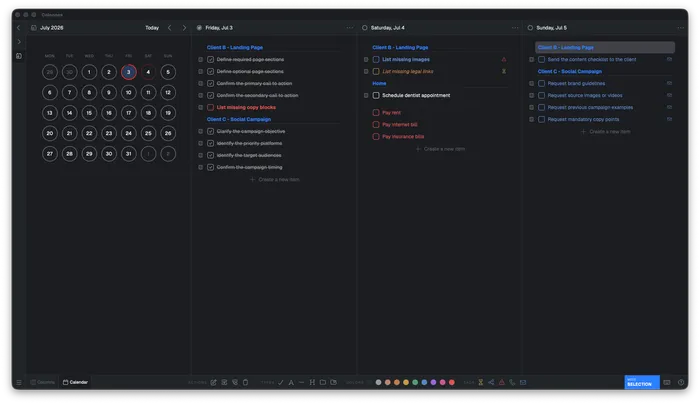
Colonnes task management interface with multiple columns

Break tasks down fast, without procrastinating on planning

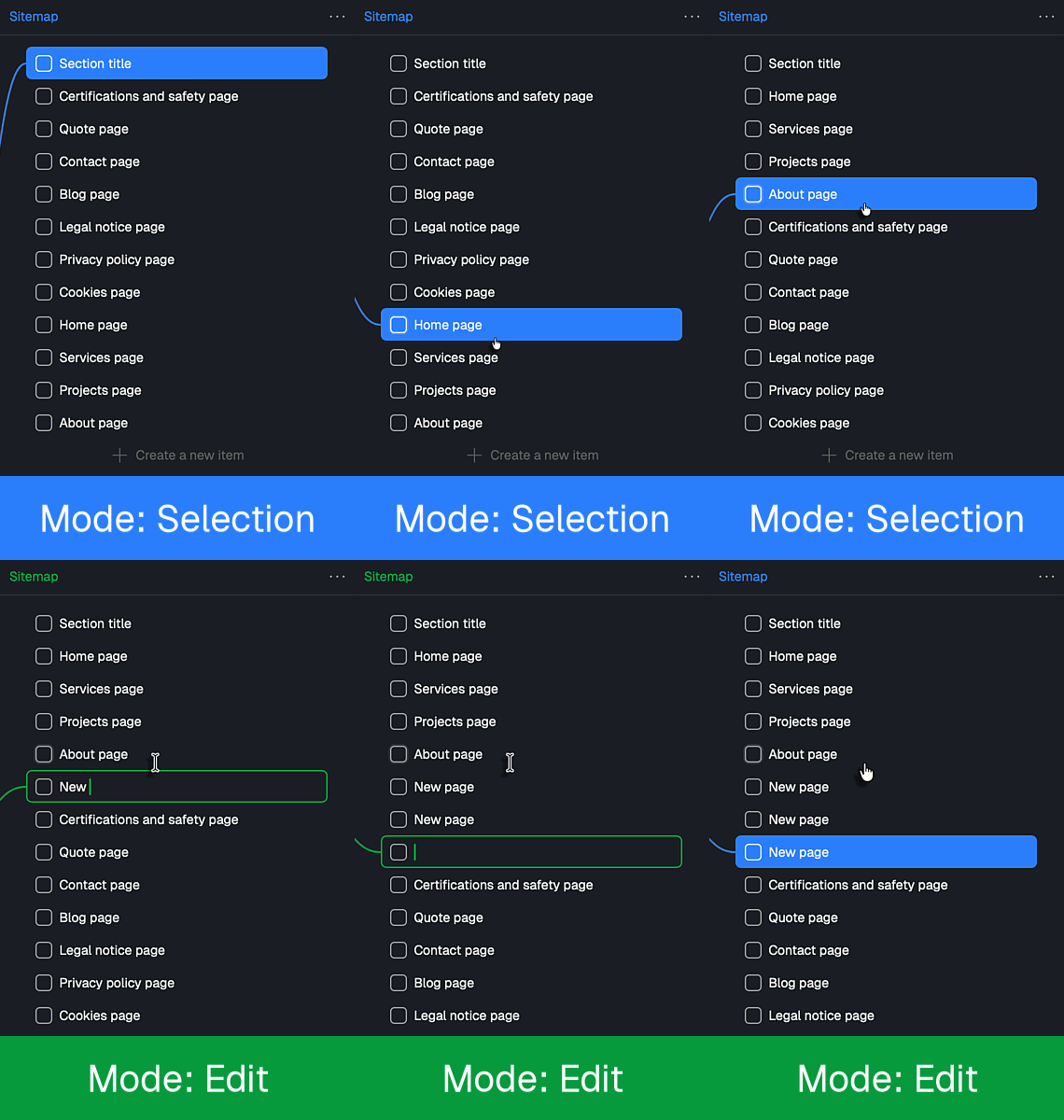
Speed matters. If breaking down tasks feels slow, you will not do it consistently. That is why Colonnes has two complementary modes:

  • Selection mode to navigate and reorganize tasks like a file explorer
  • Edit mode that turns the columns into a fast text editor, similar to Word or Notion, so you can write tasks at high speed

Colonnes works fully with the mouse, but you can also use it partly or entirely with the keyboard for maximum efficiency.

Colonnes selection mode - select and organize tasks
Colonnes edit mode - write tasks as fast as in a text editor

Execution mode: Stack

Stack is a focused execution mode that guides you through tasks one by one. The current task stays always visible, progression is always shown, and you can add optional time pressure, with a fixed duration, an end time, or Pomodoro.

There are two different modes:

  • Local Stack keeps a small always-on-top window on your desktop
  • Remote Stack mirrors the same Stack on your phone via a QR code, turning your phone into a simple next-action copilot, instead of a distraction machine
Colonnes local stack mode - compact window staying on top
Colonnes remote stack on mobile phone

Stronger feedback, optional but powerful

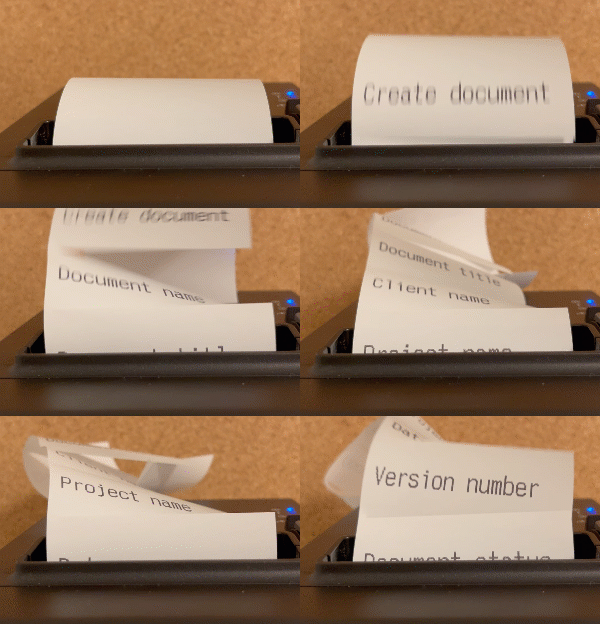
If you want maximum tangible feedback, Colonnes can print each atomic task on a thermal receipt printer (like the kind you might see in a supermarket) or a standard printer (in that case, you will need to cut the paper with scissors). When you finish a task, you can physically crumple the receipt and drop it into a transparent jar, making progression visible, physical, and satisfying.

Colonnes print dialog with receipt printer preview

Summary

  • Column view: Perfect for atomic tasks, and it helps you avoid overwhelming lists.
  • Selection and Edit mode: Write, break down, and reorganize tasks very quickly.
  • Task groups with progression: Progress becomes visible automatically, across multiple levels.
  • Atomic tasks with minimal fields: Do not manage metadata, manage actions.
  • Stack: The next action always visible, momentum stays steady and time pressure is optional.
  • Printed tasks: Stronger tangible feedback, and tasks that stay always visible and are hard to ignore.

Get started

Colonnes is available for Mac and Windows. Version 1 is available as a one-time lifetime purchase, with no subscription. If the software is not right for you, we offer a full refund within 30 days after purchase.

App v1
$59/ once(excl. tax)
Use the code "BETA" to get 20% off.
All features included
Lifetime updates
3 devices
Mac & Windows
30 days money back guarantee

Important notes

If you decide to buy a receipt printer, follow the purchasing advice in the Support section to make sure the printer is compatible with your operating system and with Colonnes.